How Internet Works
Connecting the Dots
The internet isn't a single thing, it's a series of handshakes, lookups, and translations that happen in milliseconds. Let's trace a single request from your keyboard to a database halfway across the world.
Most of us take it for granted: you type a URL, hit enter, and a fraction of a second later, a world of information appears. But between that keystroke and the rendered page lies a complex, multi-layered choreography of protocols and hardware.
This post deconstructs that journey. We'll follow a single request as it exits your browser, traverses your home Wi-Fi, navigates the sprawling infrastructure of your ISP, and finally reaches the "edge" and data centers that host the modern web. Every step from local ARP lookups to global BGP routing plays a vital role in the mosaic of global communication.
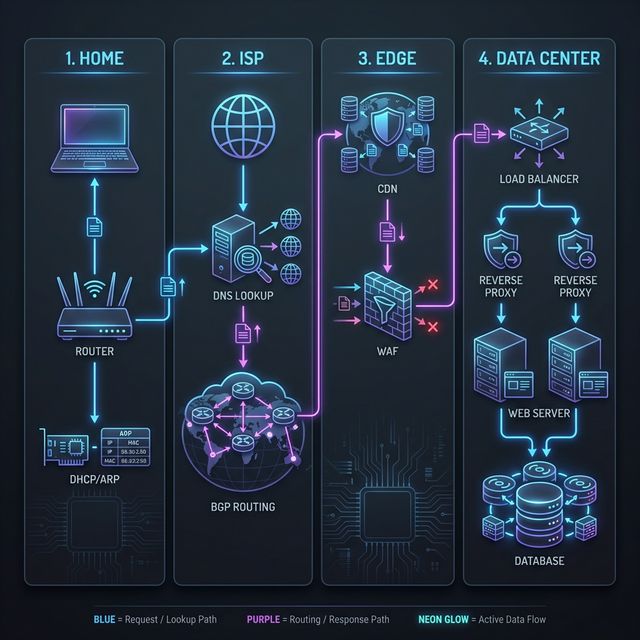
Phase 1: The Local Network (LAN)
The journey begins on your device before you even touch the "real" internet.- Identity & Configuration: Your computer needs an address. It uses DHCP to automatically lease an IP Address (or an IPv6 address) from your router.
- Hardware Handshakes: To talk to your router, your computer needs to find its physical hardware address using ARP (Address Resolution Protocol) to map the IP to a MAC Address.
- Local Gateway: Your request hits the router. Because your home uses private IPs, the router uses NAT (Network Address Translation) to "cloak" your device. The router also manages your local Subnet, ensuring that traffic meant for your printer doesn't leak out to the internet and that your internal home network is logically divided.
- The Exit: The data is chopped into Packets, which are sent out through a specific Port. Depending on the application, it will use either TCP/IP for reliability or UDP for raw speed (common in gaming, video calls, or DNS). These packets travel onto the ISP's fiber lines.
Phase 2: The Core Internet (WAN)
Now your request is in the "wild," traveling across the global backbone.- Finding the Destination: Your browser doesn't know where
google.comis. It performs a DNS (Domain Name System) lookup. If the domain was recently bought, it might still be propagating through Domain Name Registration servers. - Establishing Trust: Once the IP is found, your browser starts a TCP/IP handshake. To make it secure, it layers on SSL/TLS to create an HTTPS connection. If it's a modern site, it might use HTTP/3 & QUIC to bypass TCP's speed limits.
- Global Routing: Your packets don't take a straight line. They are moved by Switching and Routing equipment. The global path is determined by BGP (Border Gateway Protocol), which acts as the internet's GPS, navigating through different Autonomous Systems.
Phase 3: The Edge & Security
Before reaching the server, the request is inspected and optimized.- The Front Line: Most big sites use a CDN (Content Delivery Network). If the content is already in the Cache at an edge server near you, the journey ends here—saving thousands of miles of travel.
- The Gatekeeper: If not cached, the request hits a Firewall and possibly a WAF (Web Application Firewall) to check for malicious patterns.
- The Anonymizer: If you are using a VPN or a Proxy Server, your request is further encapsulated or forwarded to hide your original location and identity.
Phase 4: The Data Center
The request has finally arrived at the destination's home.- The Traffic Cop: A Load Balancer receives the request and decides which specific server in the data center is least busy and should handle it.
- The Web Server: The request hits a program like Nginx or Apache (Hosting). It interprets the HTTP headers.
- Real-Time Data: If the page needs live updates (like a chat or stock price), it might upgrade the connection to WebSockets for a persistent two-way pipe.
- Communication & Response: The server processes the request (often involving Data Communication with internal databases) and sends a response packet back through the same layers of the Networking stack.
How it all connects
This entire process—from ARP at home to BGP in the core to Load Balancing in the cloud—is what defines modern Communication. Every note in this collection is a tile in the mosaic of the global internet.